Most productivity stacks are really sync problems in disguise. Tasks in one app, habits in another, projects in a doc, and a calendar that knows nothing about any of them. You spend more time maintaining the system than doing the work.
MenaTask Tasks runs a full GTD flow — inbox, today, this week, kanban, list, time blocks, timeline, calendar, Eisenhower — all on the same task record. No duplicate entry. No “which app had the real due date?”
Capture fast and execute with context.
Add Task menu and every attribute explained — due dates, time blocks, tags, contexts, habit tasks, Focus Mode, and more.
A task without context is just a word on a list. You capture it, feel briefly organised, and then open the list on Monday morning to find fifty items with no indication of what matters, what’s time-sensitive, what belongs to which project, or what you were actually thinking when you wrote it.
The other failure mode is the opposite: a system so complex you spend your evenings maintaining it instead of resting. Five apps, three integrations, one export that broke last Tuesday.
The GTD inbox exists for one reason: to separate capture from clarification. When an idea or commitment lands in your head, the last thing you need is to decide where it goes before you’ve even finished thinking it.
Dump it. Decide later. Nothing disappears into a forgotten list — the inbox count stays visible until you clear it.
Different moments in your week require different lenses on the same work. MenaTask gives you all of them, powered by the same underlying task record.
Today, This Week & Next Week
Open the app and know exactly what deserves your attention right now — today’s lane, this week’s plan, next week’s buffer. Drag tasks forward when plans shift. Same tasks, zero re-entry.
Objectives
See your daily, weekly, monthly, and quarterly objectives beside your task list — so execution stays tied to what you actually committed to, not just what landed on the calendar.
List view
Sort and scan a familiar to-do list — by priority, due date, or project — when you need speed over structure.
Kanban board
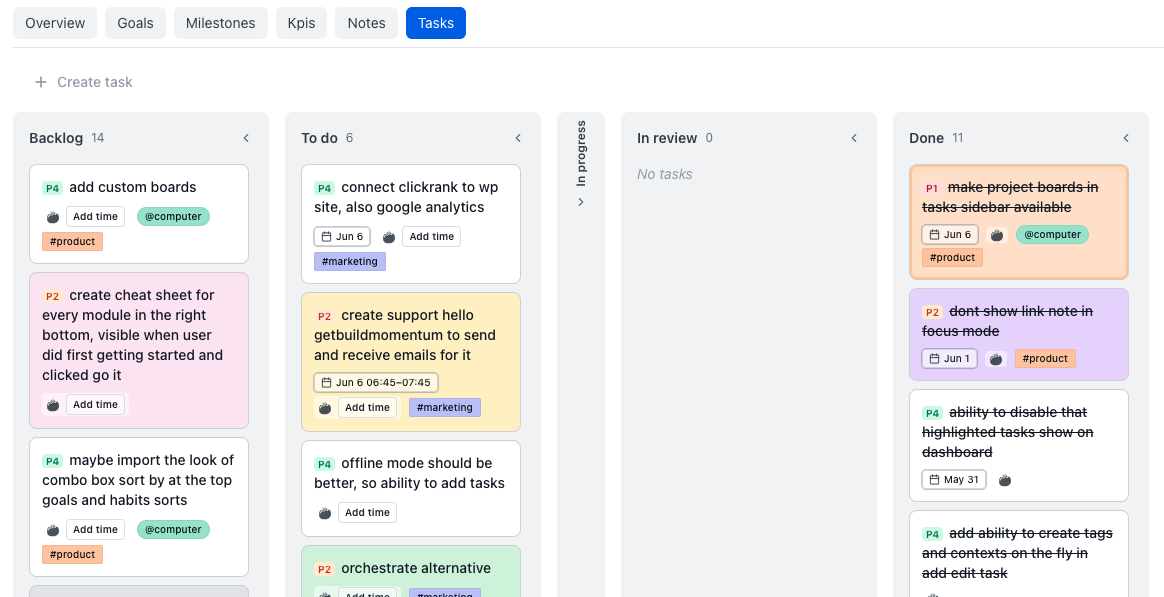
Day columns for scheduling, or a status board (Backlog → To do → In progress → Done) when you think in pipelines. Drag to reschedule or to move work forward.
Custom boards
Create custom task boards by adding different areas and projects to them — one surface for the mix of work you actually juggle, not just a single project or inbox dump.
Time blocks
Put tasks on the clock — hour grid plus an unscheduled tray. Drag blocks to reschedule. Protect deep work instead of hoping it happens.
Timeline
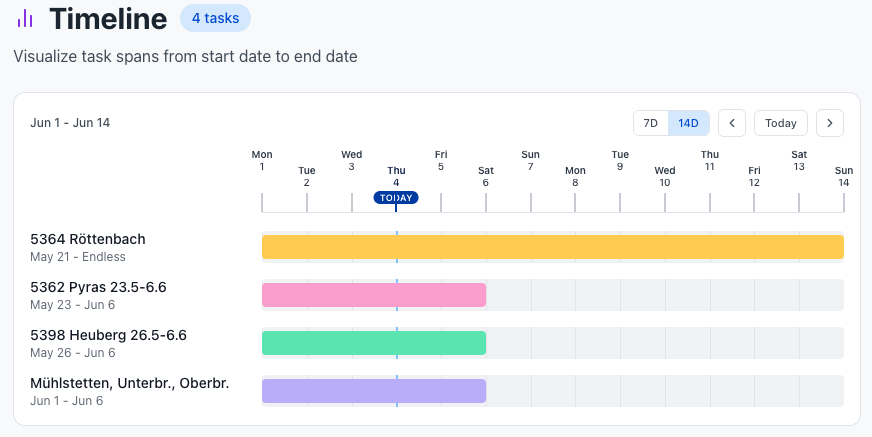
Multi-day work that isn’t big enough for a project — start and end dates as a bar across your week so commitments are visible at a glance.
Calendar
Month, week, or agenda — plus overdue and upcoming counts so nothing slips quietly. Click an empty day to add a task with the date already set.
Eisenhower Matrix
Four quadrants so loud-but-unimportant work stops stealing deep-work oxygen — using the same importance and urgency you set once on the task.
Reminders
Get nudged before a task is due — 1 hour, 15 minutes, or right at start. Snooze, complete, or dismiss without digging through the full list.
! tokens inline to set every detail without touching the mouse.Familiar to Todoist and TickTick power users — with more depth.
Buy milk !due:15.4. !st9:00 !ee:25 !pr:Home !i4 !hl!due:15.4.2026 — due date!st9:00 !et10:00 — scheduled start and end time!sd:1.1. !ed:2.1.26 — multi-day span for Timeline!ee:25 !ae:20 — estimated and actual effort in minutes!pr:Work — assign to a project@phone #errand — context and tag!i4 !u2 !d1 !p2 — importance, urgency, difficulty, priority!c:pink or !c#D6E5FA — color by name or hex!hl — highlight, pins to top of dashboardOne line. Zero clicks. Everything set.
Hit the ? button in the title field any time for the full token reference.
@home, @calls, @computer. Filter across every view.#waiting, #deepwork, #client.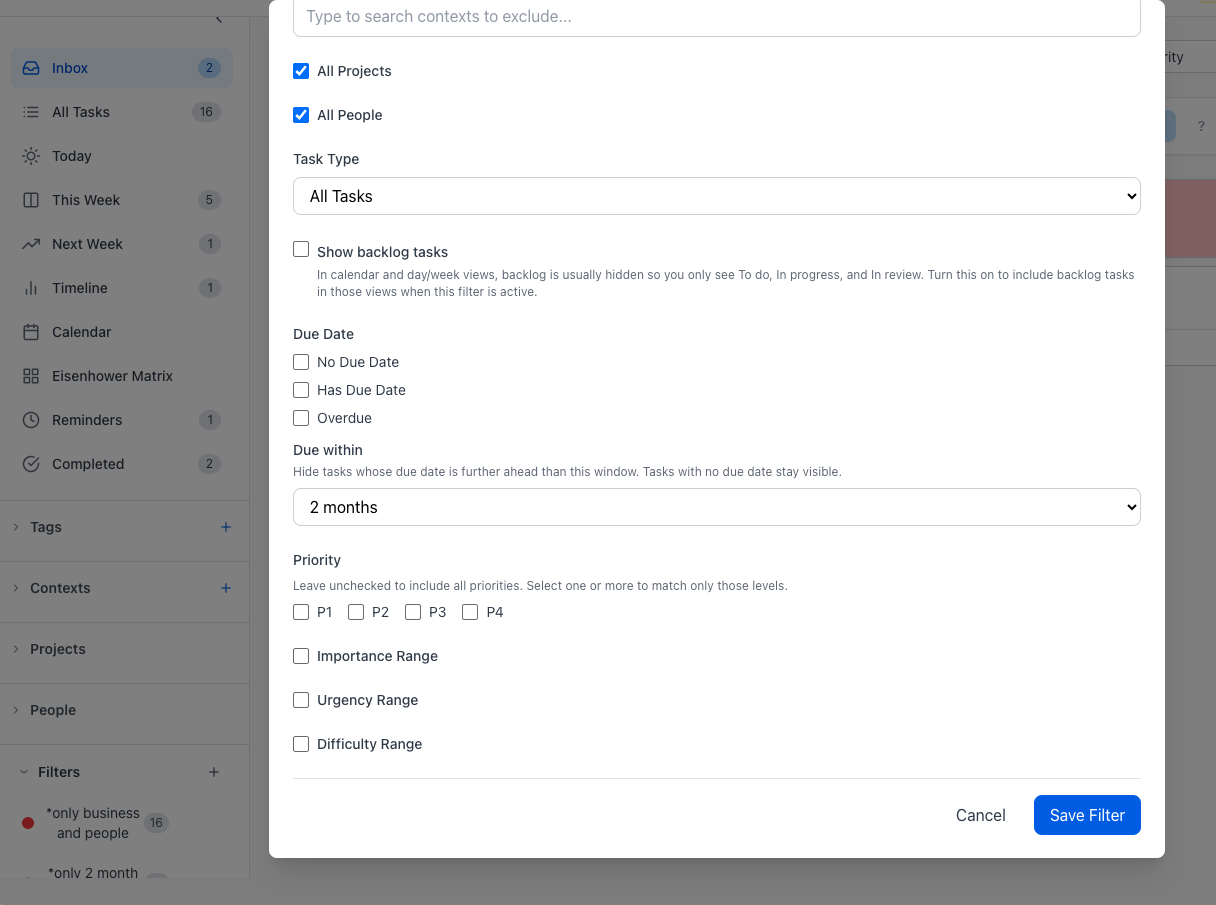
Contexts answer: where or with what am I doing this?
@phone, @computer, @errands, @home — batch by tool, energy, or location so you’re not context-switching between a call and a deep work session because your list didn’t know the difference.
Tags answer: what theme does this belong to?
#waiting, #deepwork, #tax, #client — cross-cutting themes that run across projects. Stack tags with contexts for surgical filtering.
Saved filters answer: how do I get back to this exact slice in one click?
Combine context, tag, project, due window, highlight, and goal-linked criteria into a reusable filter. “This week + @calls”. “Deep work + not scheduled”. “Client X + high importance”. One click on review day. No rebuilding the mental model from scratch.
Areas answer: how do I see only Work — or only one side project?
Group projects under life areas in the sidebar. Filter Today or This Week to one area when you need focus, without maintaining separate apps for work and personal.
Bulk edit — when plans change fast
Select multiple tasks and reschedule, retag, reprioritize, or complete them in one pass. Monday morning after a chaotic week shouldn’t mean clicking fifty times.
When it’s time to execute — not plan, not triage, not organize — Focus Mode gives you a single task overlay that removes everything else from view. The work you chose is the only thing on screen.
Linked notes sit beside the task so you don’t tab away for context. Bump actual time (+5m, +15m, +30m) as you go — your effort log stays honest without opening the full editor.
Up to 50 tasks, core list and kanban workflows, due dates
Up to 2,000 active tasks, advanced filtering, saved filters, improved review workflows
Unlimited active tasks, maximum workflow flexibility
Active means incomplete. Complete or delete tasks to free up slots on any plan. Your completed history is always preserved.
The differentiator isn’t raw task count. It’s what tasks connect to.
Strong task surface with a decent habits layer. But habits and strategy stay shallow unless you duct-tape more apps together. No unified project KPIs, no integrity coin system, no contracts — execution and accountability still live in separate tools.
Excellent capture and a clean interface. Goals and deeper accountability live somewhere else. Karma gamifies volume more than the integrity of the commitments you actually care about. Budget, relationships, and project narrative still fragmented.
Tasks beside habits, projects, notes, and people — one login. Full GTD views plus Eisenhower plus power typing. Integrity Coins and contracts align stakes with the outcomes you chose. The list isn’t a graveyard. It’s connected to everything that matters.
What’s the difference between Inbox and All Tasks?
Inbox shows incomplete tasks with no context assigned — it’s the pure capture lane for things that still need a decision. All Tasks shows everything active regardless of context assignment.
What if I have ideas I’m not ready to act on yet?
Put them on the status board in Backlog. They stay out of Today until you promote them — so your daily list stays honest and your someday/maybe list still exists when you’re ready to review it.
Is the syntax the same as Todoist or TickTick?
Similar idea, more attributes exposed. The ! token system covers everything from dates and times to importance, urgency, difficulty, color, and highlight. Hit the ? button in the quick add title field for the full reference.
Can I use Tasks without the rest of MenaTask?
Yes. Start with Tasks alone. Add Goals & Habits, Projects, or Notes when your work outgrows a list.
What counts as an “active” task for plan limits?
Any incomplete task. Completing or deleting tasks frees up slots. Your completed history is always preserved regardless of plan.
Start free — no credit card required.
