MenaTask Logo MenaTask
PLAN → DONE.

Everything you're juggling — goals, habits, projects, notes, tasks — actually working together, for once.

You have the goals. You have the intention. But between plan and doing, things slip. A habit tracker you stopped opening. A project that stalled. The quiet feeling you’re forgetting something.

MenaTask brings work and life into one connected system — no friction, no fragmentation, nothing slipping through. Free to start.

✓ Free to start  ·  ✓ No credit card required  ·  ✓ Disable modules you don't need
See How It Works ↓

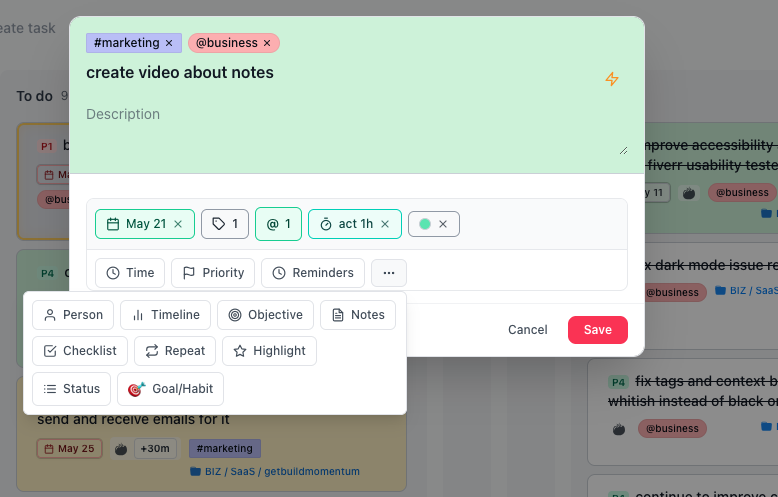
MenaTask daily dashboard — goals and habits MenaTask task creation on kanban board

Best-in-class tools. All connected. One login.

Core modules

Bonus modules

Dive deep into every module in the free version and see what clicks. Love Tasks but already have a budget tool you’re happy with? No problem — just turn off the modules you don’t need, and they’ll disappear from your navigation entirely.

Why one system beats five apps

Todoist, Notion, a habit tracker, and notes that never talk to each other. Here’s what you drop — and what you get.

❌ The usual stack

  • Todoist/TickTick: tasks only — weak or no habits, projects, notes
  • Notion: powerful, but you build the whole system yourself
  • Habit apps: streaks that fade — or Beeminder’s $5–$810+ charges
  • Bear/Obsidian: great notes, not linked to tasks or projects
  • Five logins, five bills, constant context switching — and apps you keep paying for even when you barely open them

✅ MenaTask

  • Tasks, habits, projects, notes, calendar — one login
  • Notes linked to tasks and projects (unique vs Bear/Obsidian)
  • Min / target / stretch goals — not all-or-nothing
  • Accountability without surprise charges
  • GTD, Eisenhower, kanban, garden & coins
  • Structure included and easily adjustable to how you think and work — no Notion DIY maze

Vs the tools you already know

❌ Todoist / TickTick

  • Tasks-first — habits and goals stay shallow
  • No real project KPIs or notes system
  • Still need other apps for a full workflow

❌ Notion

  • Notes-first — tasks and projects feel like an afterthought
  • No built-in habit tracking
  • Every workflow is built from scratch; small changes mean hours of manual rework

❌ Beeminder

  • $5–$810+ when you fail
  • Hard to pause; pass/fail only
  • Punishment without rewards

❌ Bear / Obsidian

  • No note-to-task linking
  • Not tied to projects or habits
  • Thinking stays separate from doing

✅ Why switch to MenaTask

  • Tasks + goals + habits in one system (not another single-purpose app)
  • Projects with milestones & KPIs — without building Notion databases
  • Notes that open next to the task in Focus mode
  • Habit accountability with $0 surprise charges — pause when life happens
  • One login. One workflow. Modules you can turn off.
Core · 1

GTD Task Management

Inbox, Today, kanban, calendar, and time blocks on the same tasks. Drag to reschedule. Built on Getting Things Done.

Inbox first. Then the week.

Capture everything, then put it on the calendar — not a graveyard list.
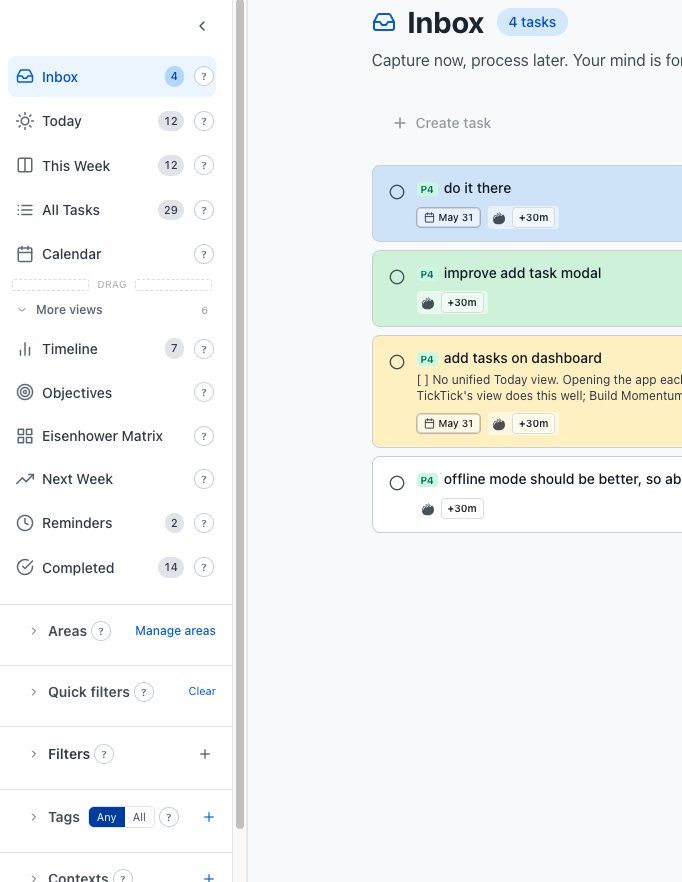
  • GTD flow: Inbox → Today → This Week → Next Week → Calendar
  • Eisenhower Matrix for urgent / important
  • Switch between Kanban, List, or Time Blocks anytime
  • Classic tasks or Goal/Habit tracking on the same surface
  • Drag & drop across days when plans shift
  • Subtasks, recurring, highlight, tags & contexts
Inbox Today Calendar Kanban Time Blocks Quick Add
MenaTask GTD inbox and task prioritization

Quick Add: set details in one line

Like Todoist, with more depth. Type the title, then ! tokens for due date, time, project, tags, and more.

Buy milk !due:15.4. !st9:00 !ee:25 !pr:Home !i4 !hl
  • !due:15.4.2026 — due date
  • !st9:00 !et10:00 — start / end time
  • !pr:Work — project
  • @phone #errand — context and tag
  • !i4 !u2 — importance & urgency
  • !hl — highlight on dashboard

One line. Zero clicks. Everything set.

Plan the week on the calendar

This Week — drag tasks across days when plans shift.
Time blocks — hour grid plus unscheduled tray.
Core · 2

Goals & Habits
Daily to quarterly

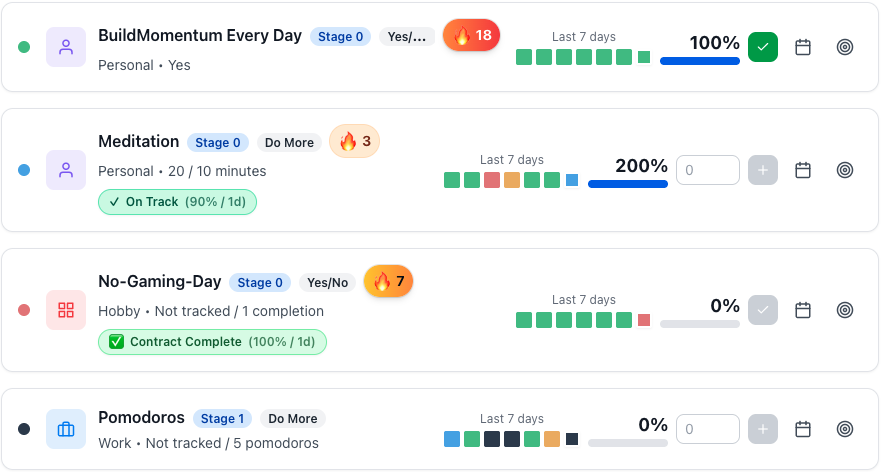
Beeminder-style accountability without surprise charges. Min, target, and stretch goals. You control the stakes.

Not all-or-nothing

Most habit apps are pass/fail. Three levels so an off day still counts — or set one simple goal if that’s enough.
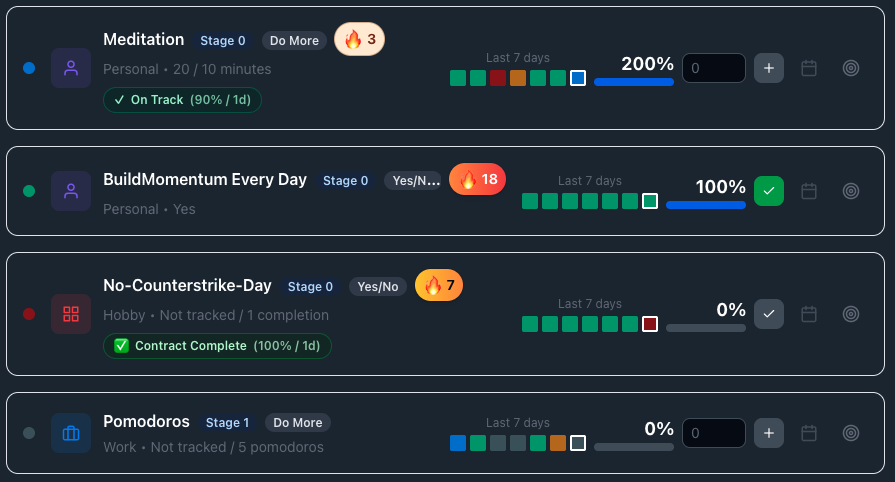
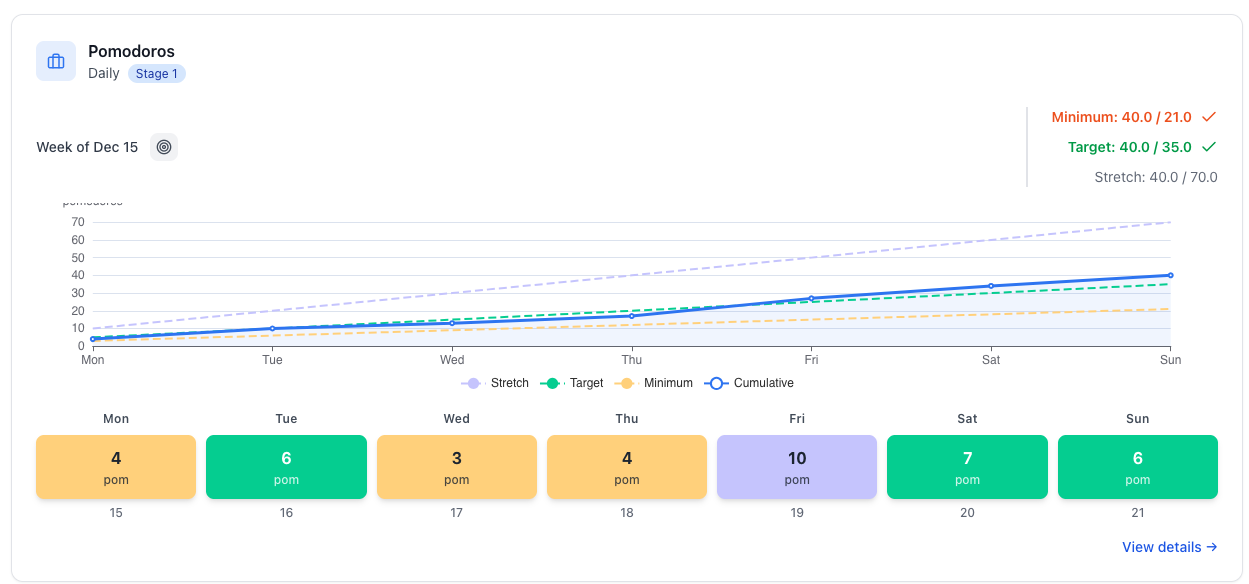
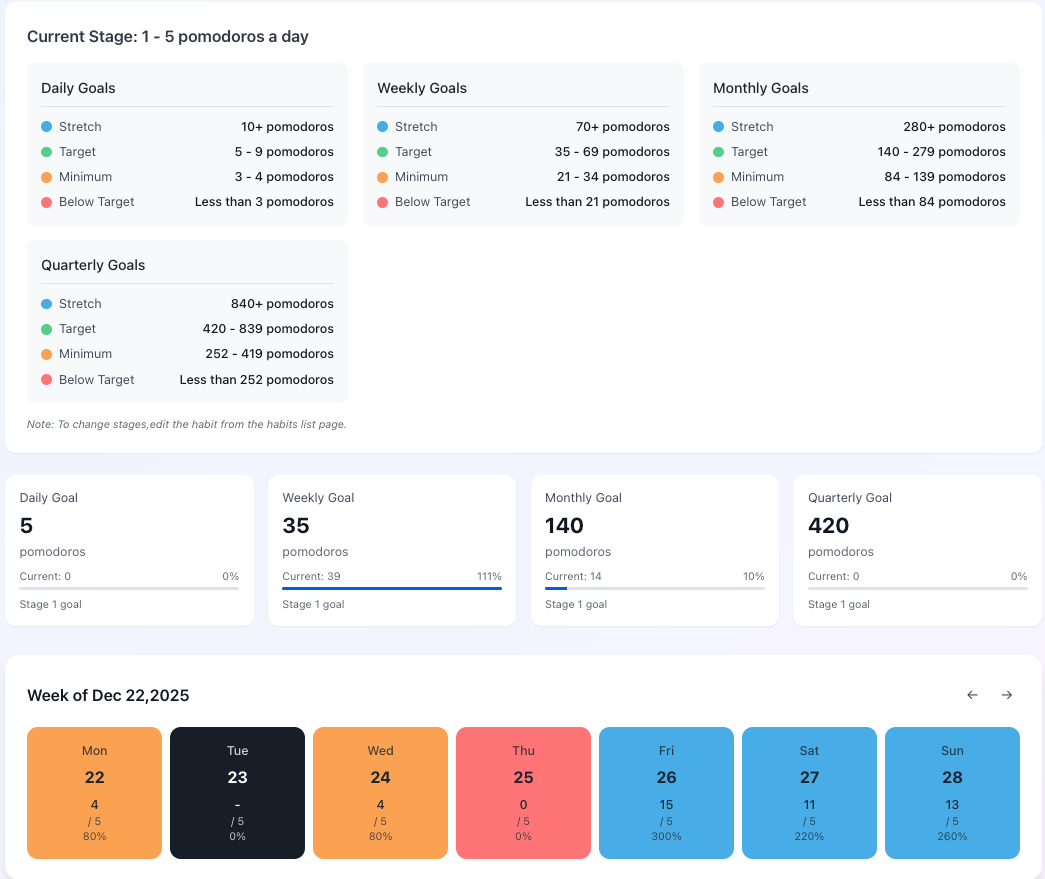
  • Minimum: bare floor for off days
  • Target: what you’re aiming for
  • Stretch: when you’re in flow
  • 3 types: do more, do less, or binary
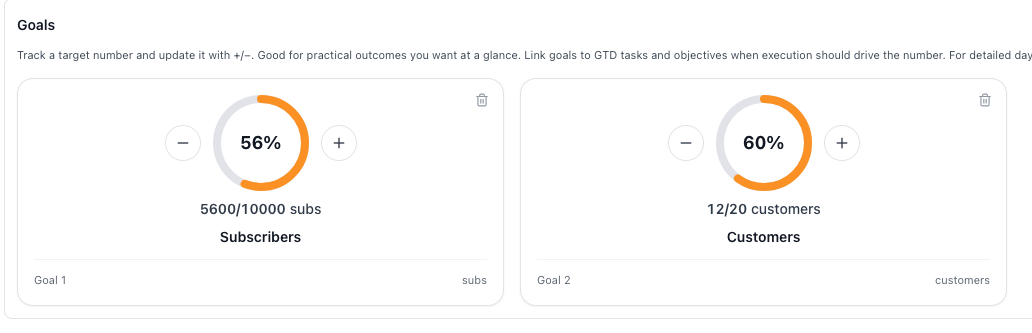
  • Daily → weekly → monthly → quarterly (12 Week Year)
  • Pause when life happens — no punishment for real life
  • Charts, streaks, reminders, color-coded goals
Atomic Habits 12 Week Year OKRs Don’t Break the Chain Kaizen
MenaTask daily dashboard — dark mode MenaTask weekly views

See progress across the whole year

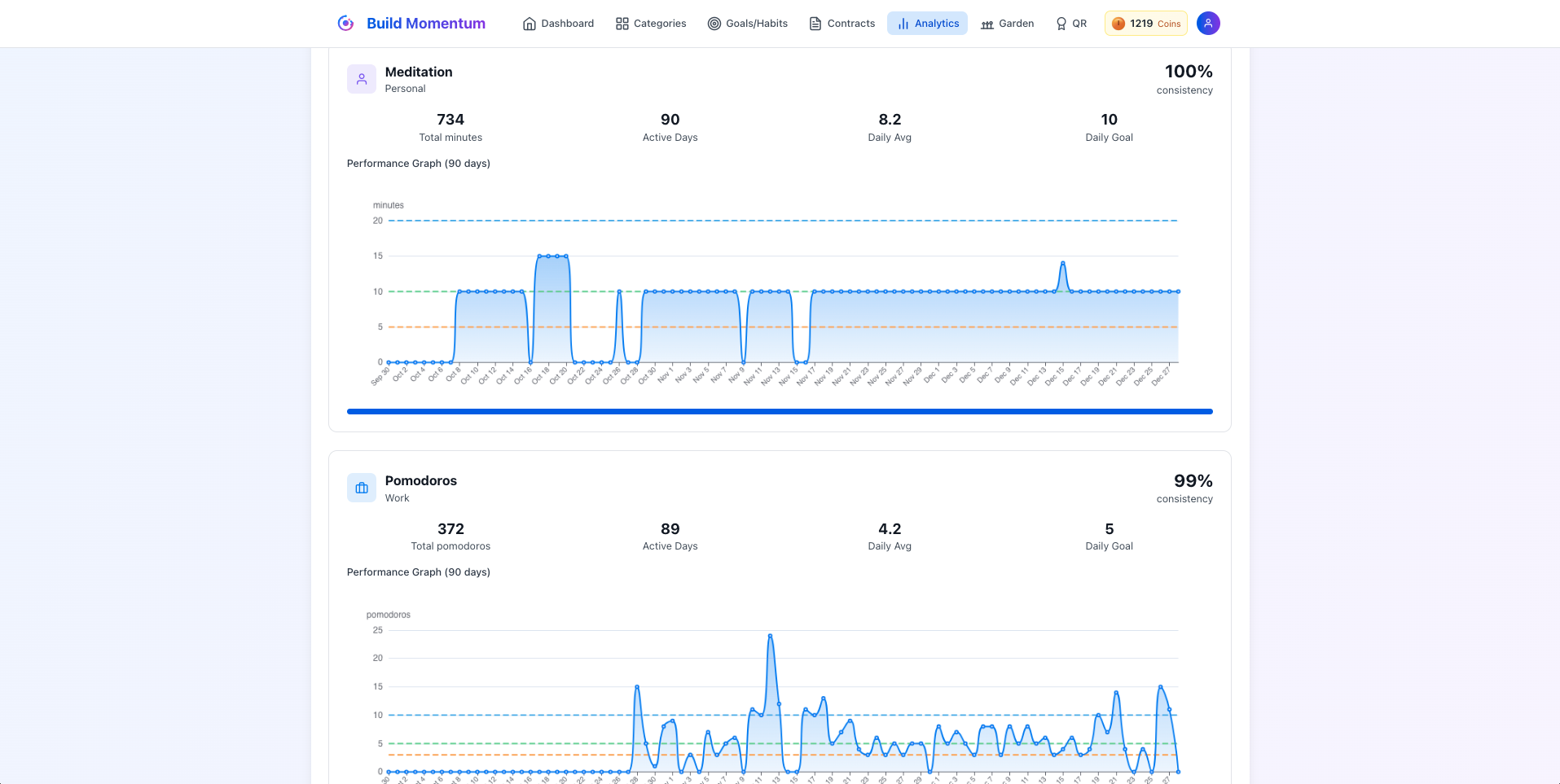
MenaTask analytics graph view
Analytics — patterns across days, weeks, and quarters.
MenaTask daily to quarterly goal tracking
Same goals, four timeframes — daily habits up to quarterly objectives.

Not just another habit app

Beeminder

  • $5–$810+ when you fail
  • Hard to pause
  • All-or-nothing pass/fail
  • Punishment only

Typical habit apps

  • Did it / didn’t — one bar
  • Streaks with no stakes
  • Easy to ignore
  • Dies after a week

MenaTask

  • Real stakes — you set them
  • Min / target / stretch
  • Daily → quarterly
  • Pause when life happens
Core · 3

Projects with Milestones, Targets & Notes

Priorities, targets, milestones, KPIs, and notes inside each project. No loose threads.

Everything for a project, in one place

Active work up front. Archive the rest. Not a task list pretending to be a project.
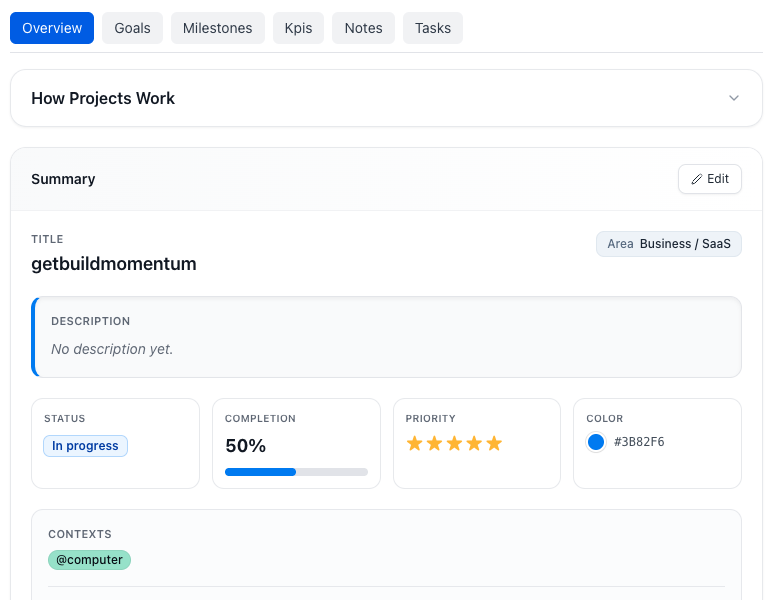
  • Organise by area (Business, Personal, Health…)
  • Star priority 0–5 so you know what to focus next
  • Targets and milestones inside the project (not a separate goals app)
  • KPIs, deadlines, and progress in one view
  • Tasks and notes embedded — open the project, everything’s there
Areas Priority Targets Milestones KPIs Project notes
MenaTask project management MenaTask project targets and milestones
Core · 4

Notes next to the work

Stop splitting thinking across Notion, Apple Notes, and random docs. Same system you use to execute.
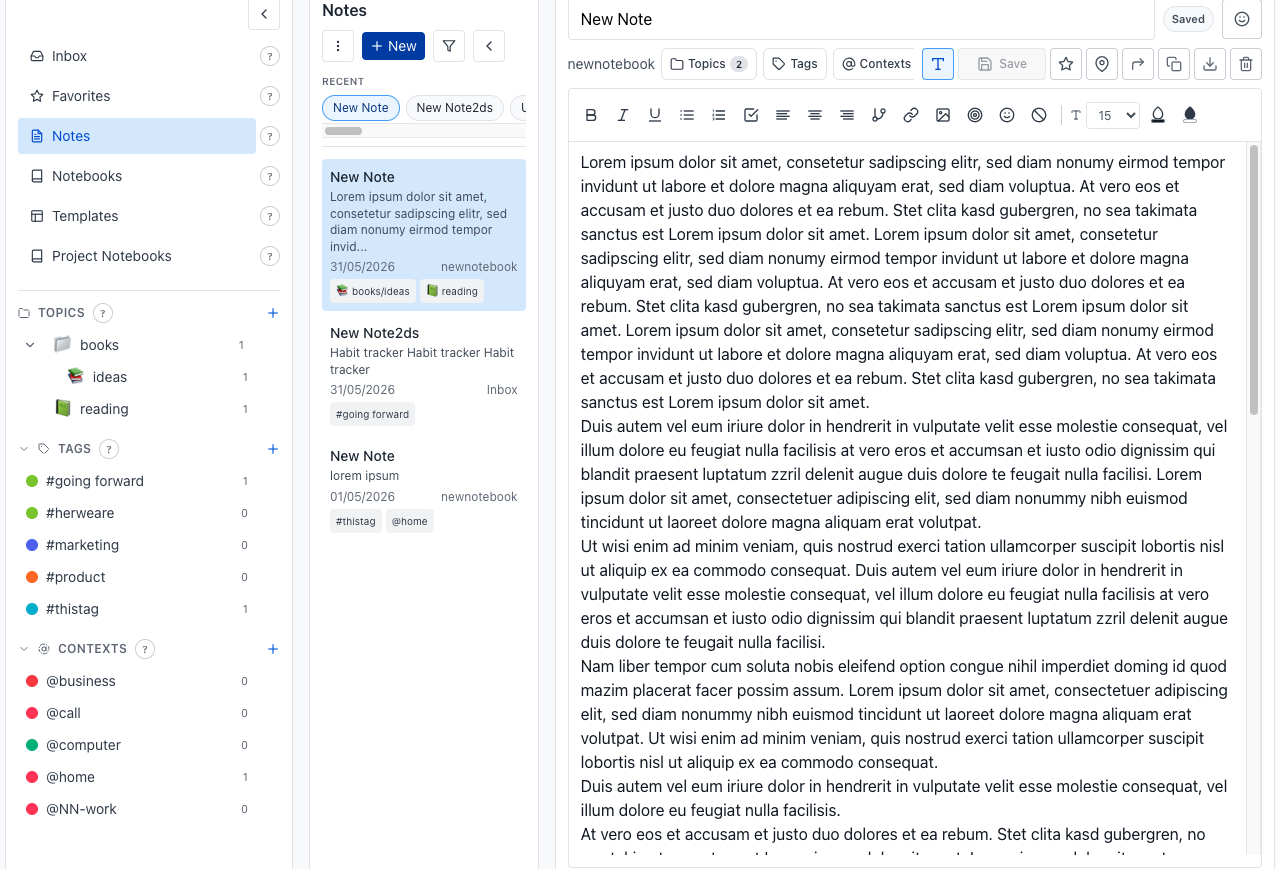
MenaTask notes section

Notes that stay in your workflow

Notes in MenaTask aren’t an afterthought — they’re woven into your projects, your daily planning, and your long-term thinking. Everything is one click away, without opening another app.

  • Organise by notebooks or topics — whatever matches how your brain works
  • Rich formatting, templates, and reusable note formats for recurring work
  • Connect notes to other notes and tasks — build a web of linked knowledge
  • Pin favorites for quick access to notes you return to often
  • Project-specific notes embedded directly in each project
  • Export notes as PDF when you need to share or archive
  • Always within reach — no app switching required
Notebooks Topics Linked notes Templates PDF export Favorites Project notes
Core · 5

Garden & Integrity Coins

Rewards for goals you chose. No loot boxes. No feed. Full philosophy →
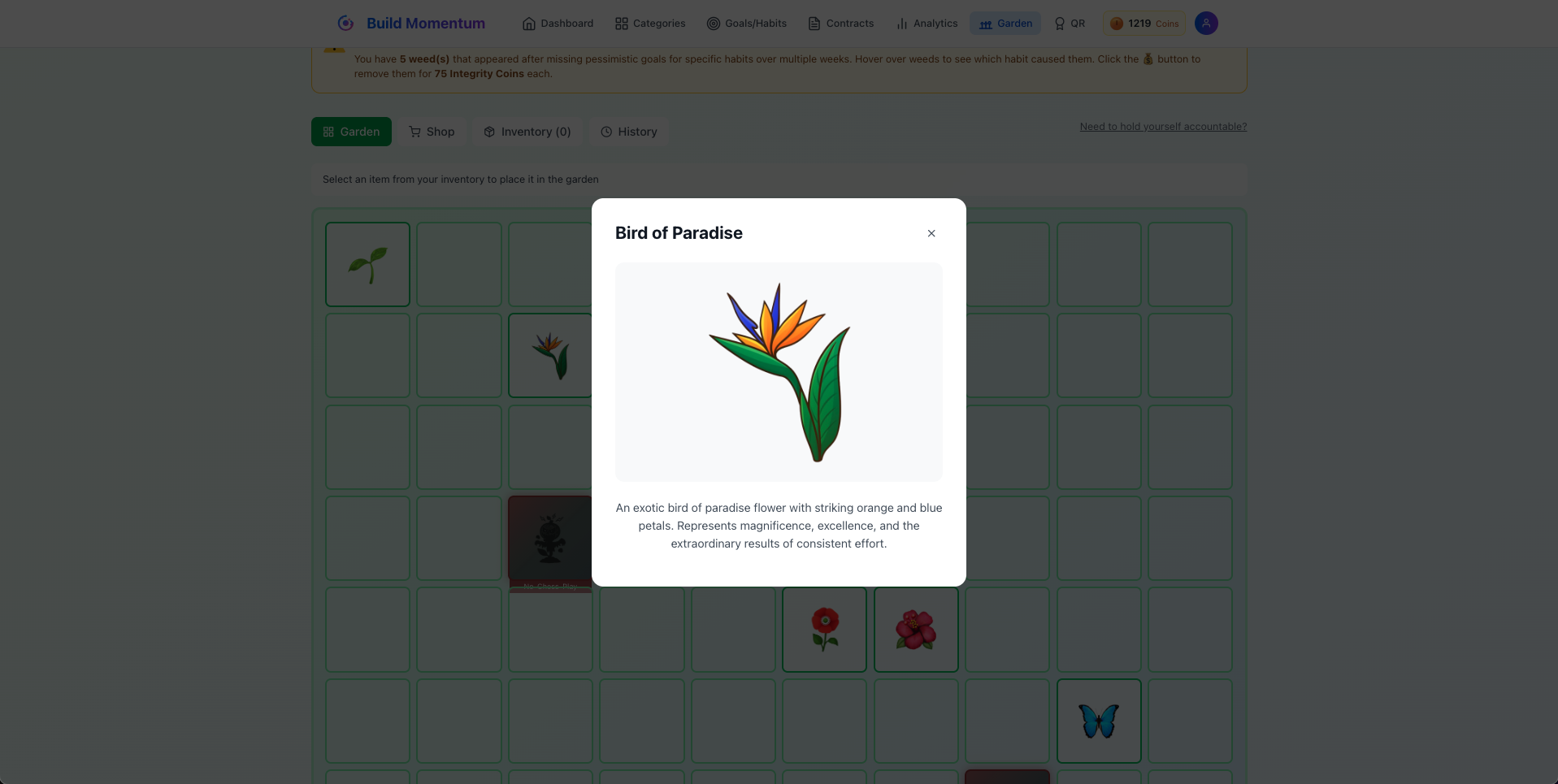
MenaTask digital garden

🌺 Progress you can see

Earn coins. Spend them on your yearly garden. Optional weeds if you want pressure.

  • 200 starter coins & daily bonuses
  • Coins for real reviews — not mindless streaks
  • Shop items unlock as you earn
  • No ads — rewards tied to your goals

Bonus modules

Bonus

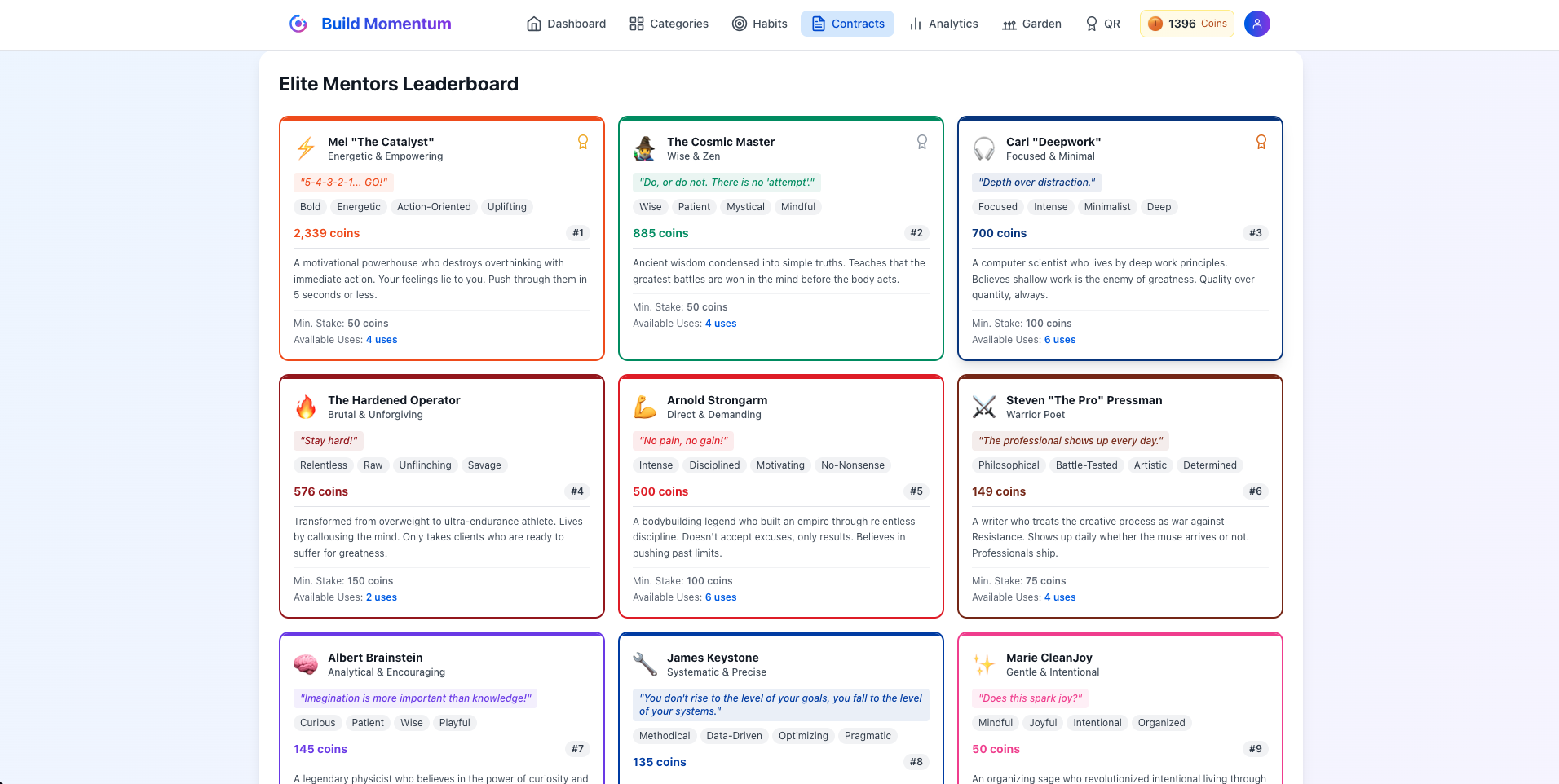
Contracts with Legendary Mentors

Stake wallet dollars on a goal. Pick a mentor. Hit it or lose the stake. Not client paperwork.

Real stakes. Your choice.

Loss aversion without Beeminder’s surprise bills. You set the stake.
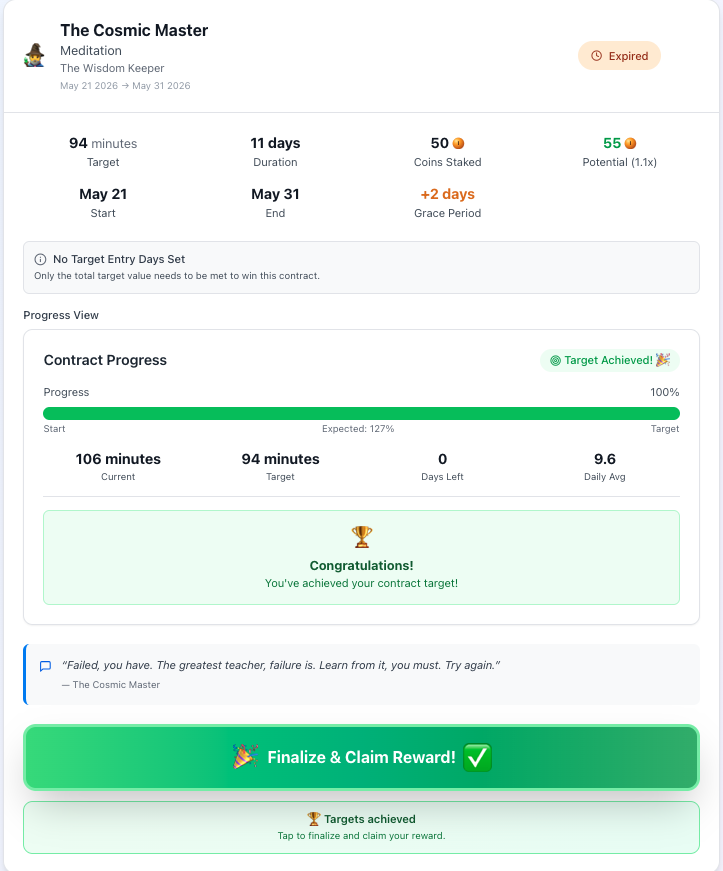
  • $30 free in your wallet when you join. Minimum stake $1
  • Win → Integrity Coins (harder goals = bigger bonus)
  • Miss → stake gone
  • 20+ mentor voices — tough love to steady encouragement
  • Reminders before you break — while you can still recover
  • Free: 1 contract. Pro: 7. Ultimate: unlimited
$30 wallet $1 min stake 20+ mentors Integrity Coins
MenaTask completed integrity contract MenaTask legendary mentor voices
Bonus

People who matter

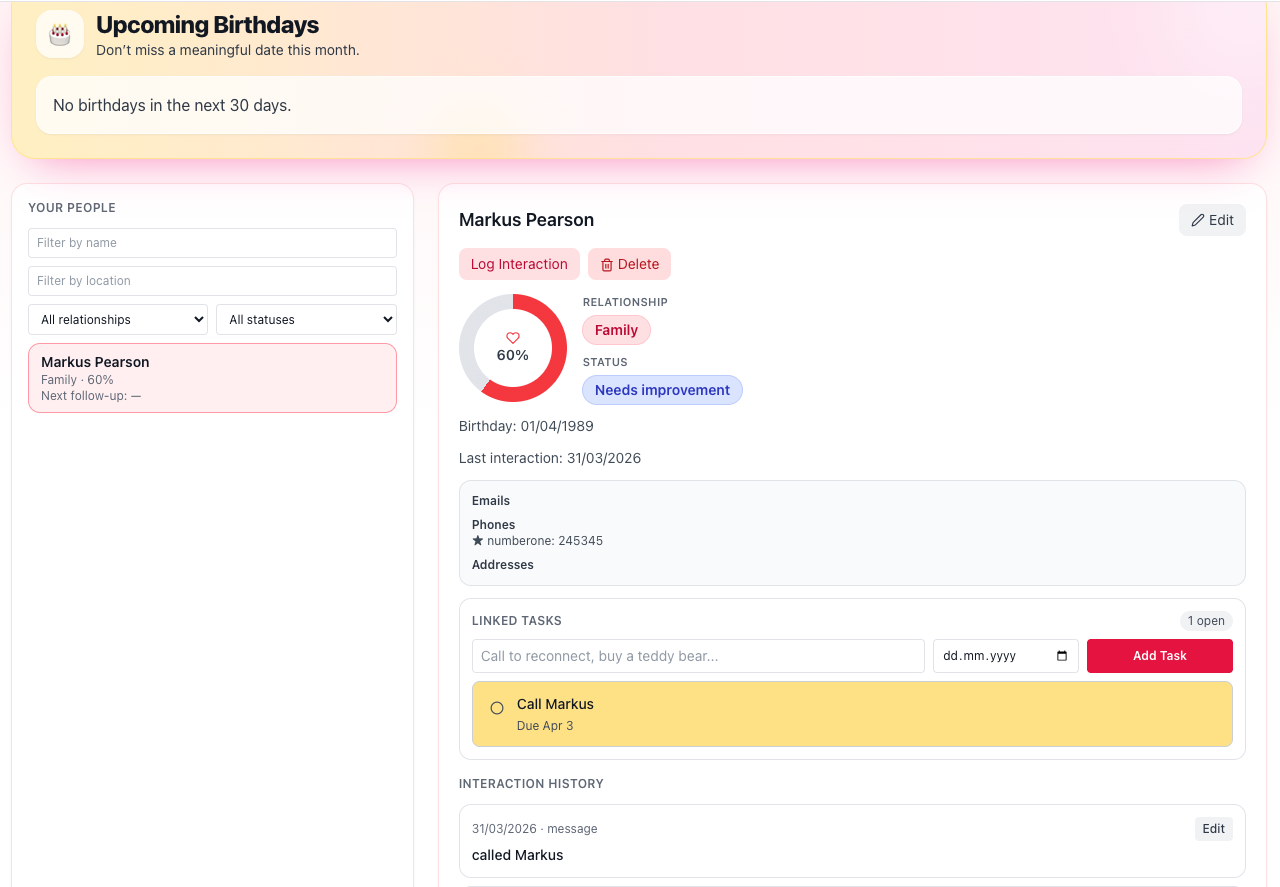
Never forget a birthday or important date again — and never get that awkward “wait, was that yesterday?” moment.
MenaTask people module

Relationship hub

Show up for the people who matter — on purpose, not only when you happen to remember.

  • Keep contact details in one place — email, phone, location, and more
  • Never miss a birthday with upcoming birthday reminders
  • See how each relationship feels — strong, fine, needs work, or check in soon
  • Log catch-ups (messages, calls, visits) with optional follow-up reminders
  • Link tasks directly to a person — “call Mom,” “send thank-you”
  • Filter by name, location, or relationship type to focus on who matters now
  • Start simple — add someone with basics and fill in the rest over time
Contact details Birthdays Relationship health Catch-up log Task links Filters
Bonus

Budget with necessity levels

Categories plus a 1–5 necessity score on every expense. Need vs impulse, not just totals.

Where the money actually goes

Categories plus a necessity score on every expense — patterns a spreadsheet never surfaces.

  • Track expenses by week and month
  • Category-based structure with clear summaries
  • Rate each purchase 1 (survival) through 5 (reckless) in one tap
  • Necessity next to every line — so treats and dumb tax show up in the data
Categories Weekly & monthly Necessity 1–5 Honest patterns
Bonus

Vision: journaling, recaps, direction

Daily or weekly journaling, period recaps, life areas, identity, and outcomes.
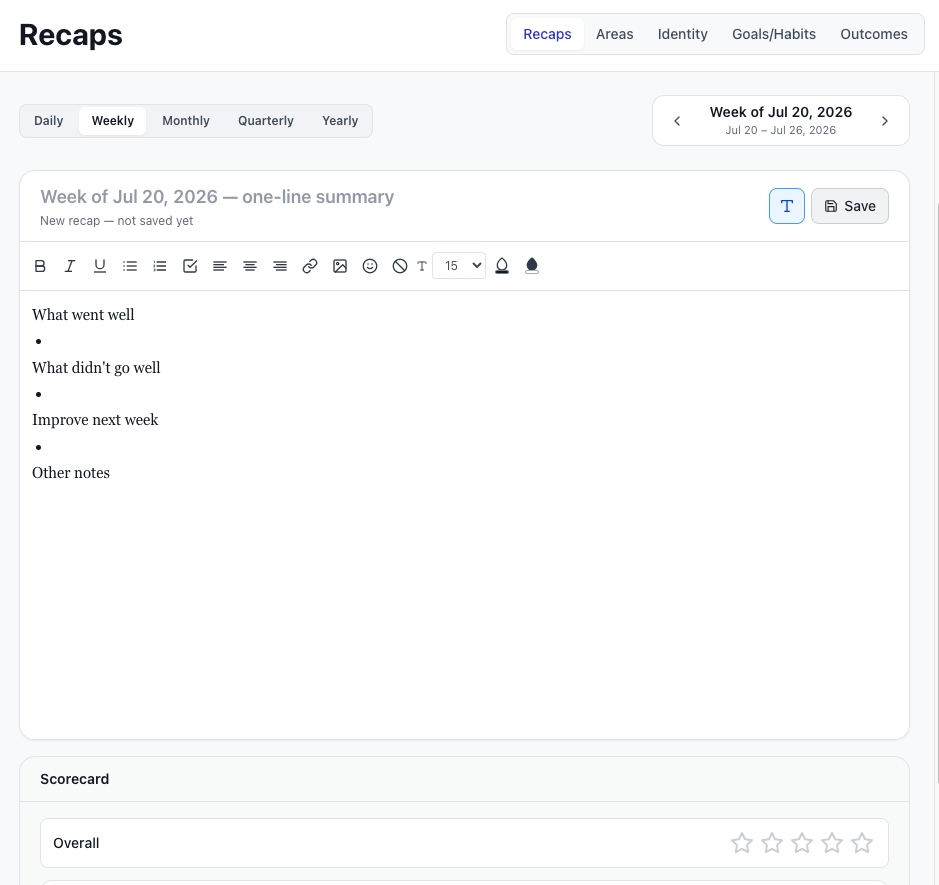
The arc, not only the day

  • Daily and/or weekly journaling
  • Period recaps across weeks and quarters
  • Life areas, identity, and outcomes
MenaTask Vision — journaling, life areas, and outcomes

Choose the Plan That Matches Your Workflow

Start free and scale as you grow. All plans include the full productivity suite.

Get Started
👤

Free

Start with core habits and goals, plus access to tasks, projects, notes, and budget with starter limits. No credit card required.

Up to 3 Goals/Habits
50 Tasks • 2 Projects
50 Notes • Budget Tracker
10 People
Garden & Weeds

No credit card required

Most Popular

Pro

More capacity, deeper workflows, stronger accountability features, expanded analytics, and full gamification access.

Up to 25 Goals/Habits
2,000 Tasks • 25 Projects
5,000 Notes • Budget Plus
Up to 100 People
7 Integrity Contracts

7-day free trial on yearly plan

Maximum Impact

Ultimate

Unlimited scale for power users with advanced insights and priority support.

Unlimited Goals/Habits
Unlimited Tasks • Projects
Unlimited Notes • Budget
Unlimited Integrity Contracts
Unlimited People

30-day money back guarantee

People Building Real Momentum

"I replaced four tools with MenaTask. Weekly planning finally feels connected to daily execution."

— Alex, Product Manager

"The goals + habits system pulled me in, but tasks, notes, and budget are why I stayed. Everything I need is in one place."

— Mira, Freelancer

"The contract system is what got me. As a former Beeminder user, having legendary mentors hold me accountable pushed me harder than any streak counter ever did."

— Daniel, Founder

Frequently Asked Questions

Why is the app called MenaTask?

Mena (intention) + Task (execution). Because the hardest part of productivity isn't finding the right tool — it's closing the gap between what you intend to do and what you actually do.

Everything in MenaTask — from goals and habits to projects and accountability contracts — exists to turn your intentions into action. No context switching. No friction. Just the shortest path from "I should" to "I did."

Is MenaTask only for habits?

No. The core is Tasks, Goals & Habits, Projects, Notes, and the Garden. Bonus modules — Contracts, People, Budget, and Vision — are there when you want them, and you can turn off anything you don’t need.

How is it different from Beeminder?

Beeminder charges real money when you fail ($5–$810+). In MenaTask you create weekly contracts where you set your stakes: Same psychological accountability. You also get min/target/stretch goals, pausing, and 3 habit types — things Beeminder doesn't offer.

Can I start free and upgrade later?

Yes. The Free plan includes all core modules. Upgrade anytime as your workflow and goals grow. If you don't like certain modules you can disable them so they don't disturb your experience.

What is the necessity level system in the budget tracker?

Every expense gets rated 1–5: from Survival (bare bones) through Need It, Want (treat), Dumb Tax (avoidable), to Reckless (wasteful). Over time you see exactly where your money is really going and why.

What is happening with my data?

We only keep what you need to use MenaTask: your account and the stuff you add — habits, tasks, notes, goals, and the rest.

It's saved securely online so it syncs across your devices. Only you can see your data in the app. We don't sell it or use it for ads.

Payments are handled by our payment provider. If you use Google sign-in, that's through Google.

Is it ADHD-friendly?

Yes. The interface is designed to be clean, color-coded, and fast. Quick data entry, no scattered information, and a calming layout that reduces overwhelm. It takes a few days to adjust, but the system becomes very natural once you get the hang of it.

MenaTask for Every Area of Life

Tasks, goals, projects, notes, and your garden. One login. Bonus modules when you want more.

✓ Free to start  ·  ✓ Earn daily coins  ·  ✓ 20+ legendary mentors  ·  Goals/Habits Deep Dive →